How To Quickly Save Bing Desktop Wallpapers In Windows 7

Written by admin. Posted in 7, Apps, Windows

Tagged: , , ,

Published on May 02, 2012 with No Comments">No Comments

FacebookTwitterStumbleUponPinterestTumblrEmailGoogle+PrintShare

If you have Bing Desktop installed in Windows 7, then you know that Bing changes your desktop wallpaper everyday with stunning images. Here’s how to quickly save Bing Desktop wallpapers in Windows 7:

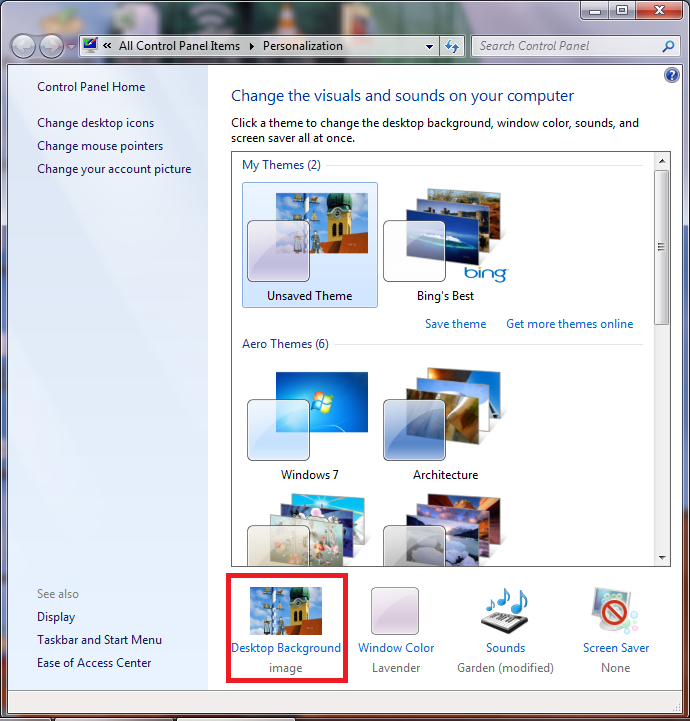
1. Right click on your desktop and select ‘Personalize’.

How To Quickly Save Bing Desktop Wallpapers In Windows 7

2. Click ‘Desktop Background’.

How To Quickly Save Bing Desktop Wallpapers In Windows 7

3. Right click the Bing wallpaper and click ‘Open’.

How To Quickly Save Bing Desktop Wallpapers In Windows 7

4. Once the Bing wallpaper is open in any of the image viewers available on your system, save it to any desired location.
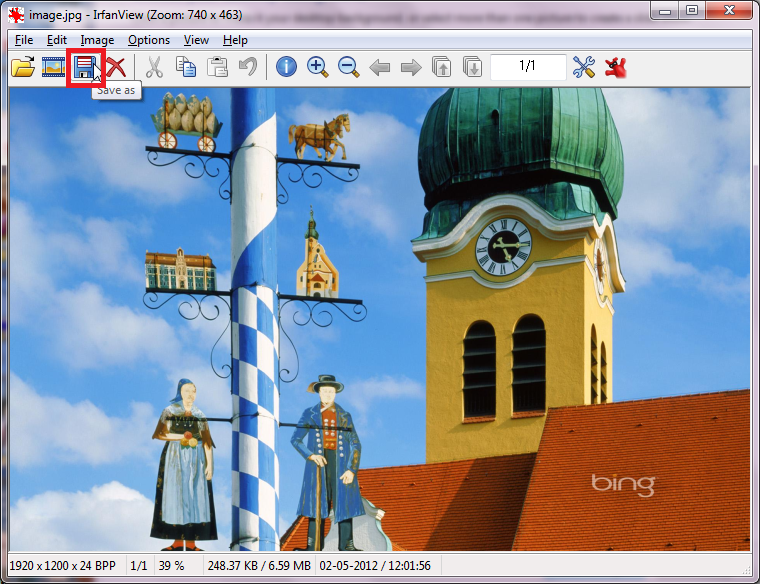
How To Quickly Save Bing Desktop Wallpapers In Windows 7

FacebookTwitterStumbleUponPinterestTumblrEmailGoogle+PrintShare