How To Install TeamViewer 7 In Linux Mint / Ubuntu
March 26, 2012
Here’s how to install TeamViewer 7 in Linux Mint / Ubuntu:
1. Go to teamviewer.com/en/download/index.aspx and click on ‘Linux’ and select the package appropriate to your distribution.
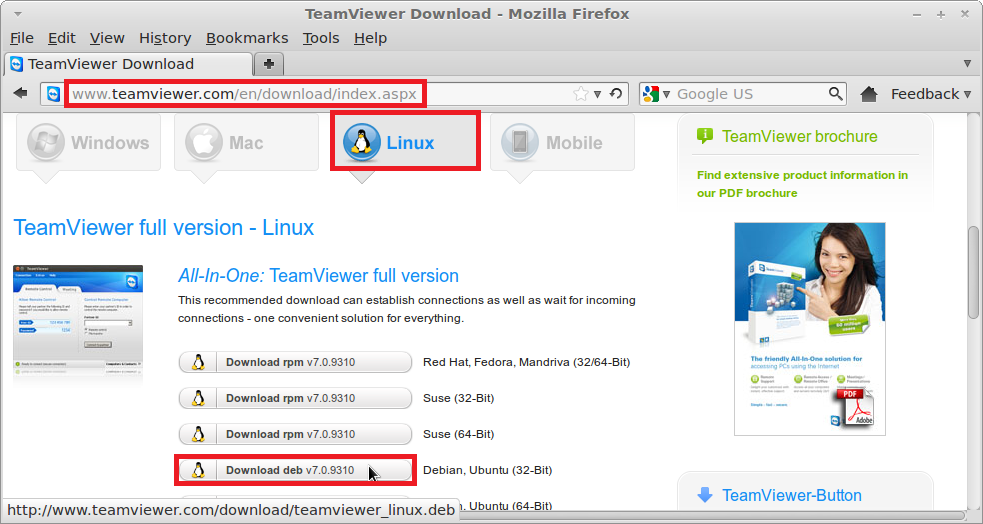
2. Select ‘Open with GDebi Package Installer (default)’ and click ‘OK’.

3. Wait while the package file is downloaded. Click on ‘Install Package’ when prompted.


4. Click ‘Close’ after the package has been installed.


5. Click ‘Applications>Internet>TeamViewer 7’ to launch the application.

6. Accept the license agreement displayed and enjoy the benefits of TeamViewer 7 in Linux Mint / Ubuntu.


Understanding Chrome’s Continue Running Background Apps Feature

How to Manage the Installation Sources for Edge Browser Add-ons

Max Payne 3 HD Wallpapers
4 Comments
Share http://www.linuxliveusb.com with your Windows Friends. I made a MINT 14 USB bootable flash which I am typeing right now on from WIN7 laptop. Nice to share MINT / Ubuntu with your friends. Great luck on your on your teamviewer installation.
I followed your directions for Mint 14 32 bit KDE. Works Just as you pictorialized. Great work. Thanks from Fred in Oregon. DownloadedTeamViewer Verion 8.0. Also tried downloading version 7.0 to Puppy Linux Lucid Puppy 5.2.8 a couple months back. Used the Generic targ.gz Linux version. That one installed well too on PuppyLinux. http://www.puppylinux.org 150MByte download small quick can boot from a CD or USB Flash. check it out! TeamViewer makes it easy to install.
Try this http://www.ammyy.com
Works well, doesn’t require installation or specific config, works behind gateways NAT as well as within one LAN.
Thank you so much your guidance , i successfully installed team viewer in my linux mint.