By default, clearing cache and cookies in Mozilla Firefox doesn’t remove Flash cookies stored due to use of Flash player when browsing websites.
In Linux Mint / Ubuntu, these cookies are stored in the home directory within a hidden directory, the full path for which is /home/username/.macromedia/Flash_Player/#SharedObjects.
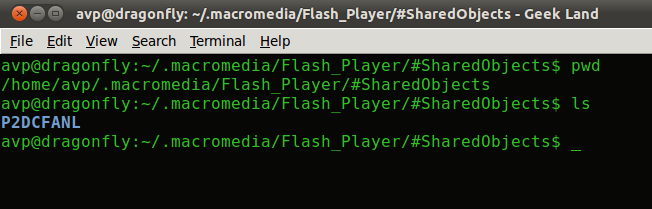
(These hidden directories and files within home folder can be viewed by navigating to home folder through Places and selecting View > Show Hidden Files).
Here is a quick way to delete the contents of the #SharedObjects folder, open Terminal and type the following :
[cc lang=”bash”]
sudo rm -rf $HOME/.macromedia/Flash_Player/#SharedObjects/*/*
[/cc]
This will erase the Flash cookies when run.
Let’s get a bit lazy and put this in a shell script, the job of which is to run the above command when executed everytime. To get familiar with what shell scripts are and what they do, this post is a good place to go.
The script we can make is something like this :
[cc lang=”bash”]
#Remove cookies stored by Flash Plug-in stored in the /home/user folder
#Demonstrated for fun by guys at ihaveapc.com
echo “Deleting Flash cookies from current user’s home directory..”
sudo rm -rf $HOME/.macromedia/Flash_Player/#SharedObjects/*/*
echo “All done”
[/cc]
Simply name the script as something related like flashcookies.sh and make it executable first before running :
[cc lang=”bash”]
sudo chmod a+x flashcookies.sh
[/cc]
Now, run the script and let it remove those Flash cookies for you 🙂 :
[cc lang=”bash”]
./flashcookies.sh
[/cc]

By the way another method to delete Flash cookies and objects is through this awesome Firefox plug-in in case above post is boring :).
Cheers.