How To Get ‘Open in Terminal’ Option In Ubuntu Linux
May 4, 2011
Here’s how to get ‘Open in Terminal’ option in Ubuntu Linux:
1. Issue the following command at the terminal –
sudo apt-get install nautilus-open-terminal

2. Reboot your system and you’ll have the option of ‘Open in Terminal’ in the right-click context menu while browsing files in Nautilus file manager.
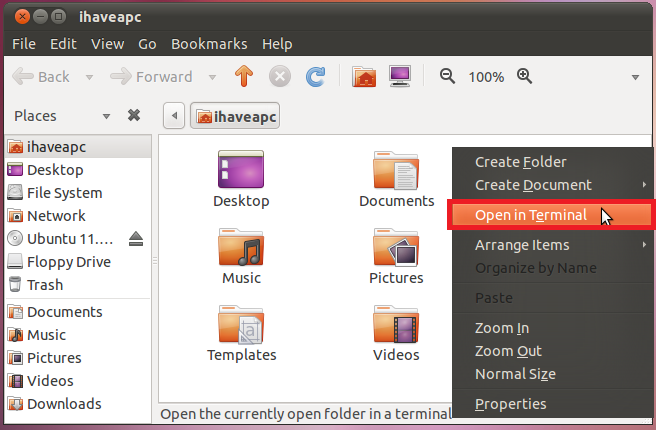
Note that this tip also works with Ubuntu 11.04 ‘Natty Narwhal’ classic desktop too.

Auto Delete Temp Files And Empty Trash In Ubuntu 19.04
Password Folder: A Free Windows Tool To Password Protect Folders
Manage Downloads In Firefox With Download Manager (S3)
One Comment
helpful tip. dont reboot! not needed… just open a terminal and type
killall nautilus
then type
nautilus&
now you can close the terminal window just be sure to include that & sign without a space in that last command.
now you will see the open in terminal in the context window when you right click within a nautilus window.
please note that executing killall nautilus will close out all existing nautilus (file manager) windows XD