How To Customize The Quick Access Toolbar In Office 2007
February 10, 2011
Here’s how to customize the Quick Access Toolbar in Office 2007:
1. In the Office 2007 application that you use, click on ‘Office Button>(Office 2007 Application Name) Options’. For e.g. in Excel 2007, we would need to click ‘Office 2007>Excel Options’.

2. Click ‘Customize’. Now select the command you want to add to the Quick Access Toolbar and click ‘Add’.

3. You can see that the command that was added in the previous step has appeared in the Quick Access Toolbar.
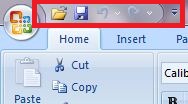
Please note that the above customization is application specific.

How To Configure Outlook 2010 To Empty Deleted Items Folder On Exit

How to Change Copilot Writing Settings in Edge
How To Recover Deleted Files In Dropbox
One Comment