Easily Customize Windows Command Prompt
October 5, 2010
The usual black and white Windows command prompt gets boring after using it for a while.
Here is how to customize it to make it a much much cooler geek type terminal :
1. Open command prompt (Start > Run > cmd)
2. Right click on the title bar and select Properties.

3. Go to Font tab and select a different size and type as per preferences.

4. If needed to resize the command prompt window size, go to Layout and choose appropriate dimensions.
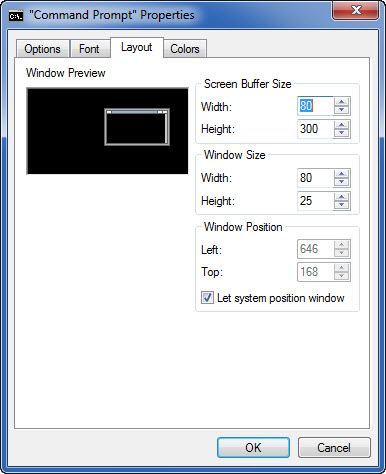
5. Finally, change that boring black and white color scheme to something much brighter 🙂

6. All done.

From now on, the command prompt will look much cooler and also geekier.
How To Disable Access To Registry In Windows 7
How To Use Dictionary Lookup When Using Microsoft Edge
How To Fix Microsoft Store Launch Error In Windows
One Comment